NL4 Editor
Nord Lead 4 editor — remote MIDI panel, banks and setlist — iPad, iPhone & Mac
NL4 Editor is an editor and librarian for the Nord Lead 4 synthesizer, on iPhone, iPad and Mac. It talks to the keyboard over MIDI, through its USB port or a standard MIDI cable. The app has no audio engine: the sound is always the keyboard's own.Read moreShow less
A panel with all 86 parameters that works both ways: turning a knob on the keyboard moves the control on screen, and turning it on screen changes the keyboard's sound. Read the keyboard's banks, gather programs from the keyboard and from files, drag them into the order you want and write them — every location is read back after writing, to verify it. Convert sounds from other keyboards in the same line and run a stage setlist.
Nord and Nord Lead are registered trademarks of Clavia DMI AB. NL4 Editor is an independent app, not affiliated with or endorsed by Clavia.
Screens
Features
A panel with all 86 parameters
Oscillators, filter, envelopes, LFOs, arpeggiator, effects, delay and reverb. It works both ways: turning a knob on the keyboard moves the control on screen, and turning it on screen changes the keyboard's sound.Read moreShow less
Reading the keyboard's banks
The app asks the keyboard for its four program banks and two performance banks, with each sound's name, category and every value.
Organizing and writing banks
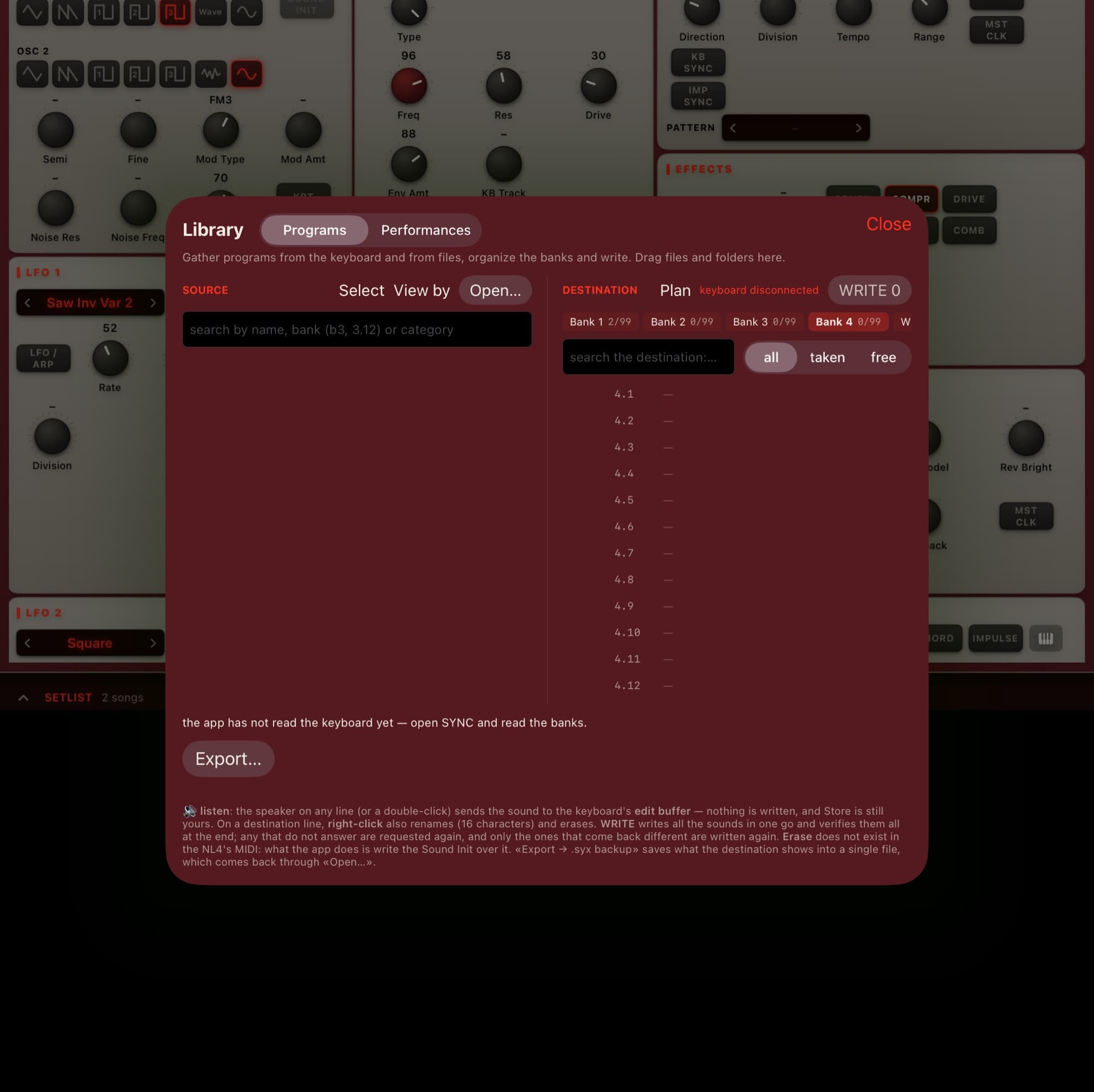
Gather programs from the keyboard and from files into one list, drag them into the order you want and write them to the keyboard. Every location is read back after writing, to verify it.
Listen before you write
The speaker on each line sends the sound to the keyboard's edit buffer — nothing is written until you decide. Rename a program (up to 16 characters), erase a location by writing the Sound Init over it and undo any step of the plan before writing.Read moreShow less
Files and backups
Opens Sound Manager programs, performances and backups (.nl4s, .nl4p, .nl4b) and .syx files, one at a time or whole folders. Exports the bank on screen as a .syx backup.
Converting sounds from other keyboards
Programs from the Nord Lead 1, 2, 2X and 3 and the synth section of the Nord Stage 2, 3 and 4 become Lead 4 programs. Anything without an equivalent is marked on each sound.
Show the other 4 featuresShow fewer
The four performance slots
Edit slots A, B, C and D, each on its own MIDI channel — and use the mod wheel, control pedal, volume and sustain on screen.
Stage setlist
Each song is a list of steps — a program or a performance. Stage mode shows the name in large type with the next step in view.
Chord Memory and Mutator
See and edit the chord notes stored in the program and write them back. The Mutator generates variations of the focused sound straight into the edit buffer, with history and a way back to the original.Read moreShow less
Where each value came from
Each control shows whether its value was read from the keyboard, sent by the app, or not read yet. The screen never shows a value it did not measure.
FAQ
Is there a Nord editor for iPad (Nord Lead 4)?
Yes. NL4 Editor is an editor and librarian for the Nord Lead 4 on iPad, iPhone and Mac: it shows all 86 parameters both ways, reads and writes the keyboard's banks with verification, opens Sound Manager files (.nl4s, .nl4p, .nl4b) and builds stage setlists. It is an independent app, not affiliated with or endorsed by Clavia; Nord and Nord Lead are trademarks of Clavia DMI AB.
Does NL4 Editor make sound?
No. It is a remote panel: the app has no audio engine, and the sound is always the keyboard's own.
Which keyboard does it work with?
The Nord Lead 4 synthesizer. Nord and Nord Lead are registered trademarks of Clavia DMI AB; NL4 Editor is an independent app, not affiliated with or endorsed by Clavia.
How do I connect the keyboard?
Over MIDI: through the keyboard's USB port or a standard MIDI cable. The app talks to the keyboard both ways.
Can I use it without the keyboard connected?
To explore it, yes: you can browse the whole panel (values show as "not read"), open the Library and import .syx files, build and undo a bank plan and open the Setlist, the Mutator and the live screens. Reading the banks, writing to the keyboard and the two-way panel need the keyboard.
Which files does it open?
Sound Manager programs, performances and backups (.nl4s, .nl4p, .nl4b) and .syx files, one at a time or whole folders. It also exports the bank on screen as a .syx backup.
Does it convert sounds from other keyboards?
Yes: programs from the Nord Lead 1, 2, 2X and 3 and the synth section of the Nord Stage 2, 3 and 4 become Lead 4 programs. Anything without an equivalent is marked on each sound.
Does the app collect data or need the internet?
No. No account, no analytics and no internet connection — everything it reads from the keyboard stays on your device.
Which devices does it run on?
iPhone, iPad and Mac (native) — coming soon to the App Store.
When does it launch?
Coming soon to the stores. Follow @rsjb_app for the launch announcement.
Can the editor erase sounds or damage my instrument?
The editor controls the instrument live and only writes to permanent memory when you tell it to — and writing over a slot replaces what was there. While you edit live, the sound being edited on the instrument is also replaced: anything you had not saved on it is lost. So make a complete backup of the instrument first, with the manufacturer’s own tools, and check the slots before you confirm. RSJB editors do not update the instrument’s firmware. You use them at your own risk: to the fullest extent permitted by law, we are not liable for data loss or damage to the equipment — see the Terms of Use for details.
What it's for
NL4 Editor is an editor and librarian for the Nord Lead 4 synthesizer, on iPhone, iPad and Mac. It is a remote panel: it talks to the keyboard over MIDI — through its USB port or a standard MIDI cable — and has no audio engine, so the sound is always the keyboard's own. It shows all 86 of the instrument's parameters and works both ways: turning a knob on the keyboard moves the control on screen, and turning it on screen changes the keyboard's sound. It reads the four program banks and the two performance banks, lets you gather programs from the keyboard and from files, reorder, rename, listen before writing and write them to the keyboard — reading every location back to verify. It opens Sound Manager programs, performances and backups (.nl4s, .nl4p, .nl4b) and .syx files, converts sounds from other keyboards in the same line, edits the four performance slots and the Chord Memory, generates variations with the Mutator and runs stage setlists. Each control shows where its value came from — read from the keyboard, sent by the app or not read yet — and the app collects no data and uses no internet. Nord and Nord Lead are registered trademarks of Clavia DMI AB; NL4 Editor is an independent app, not affiliated with or endorsed by Clavia.