NX Editor
Numa X Piano editor — all four Zones on one screen, scenes and favorites — iPad, iPhone & Mac
NX Editor is a native remote panel for the Studiologic Numa X Piano — on iPhone, iPad and Mac. It is a controller and editor, not a sound source: your keyboard stays the instrument, and NX Editor puts its whole panel on one screen.Read moreShow less
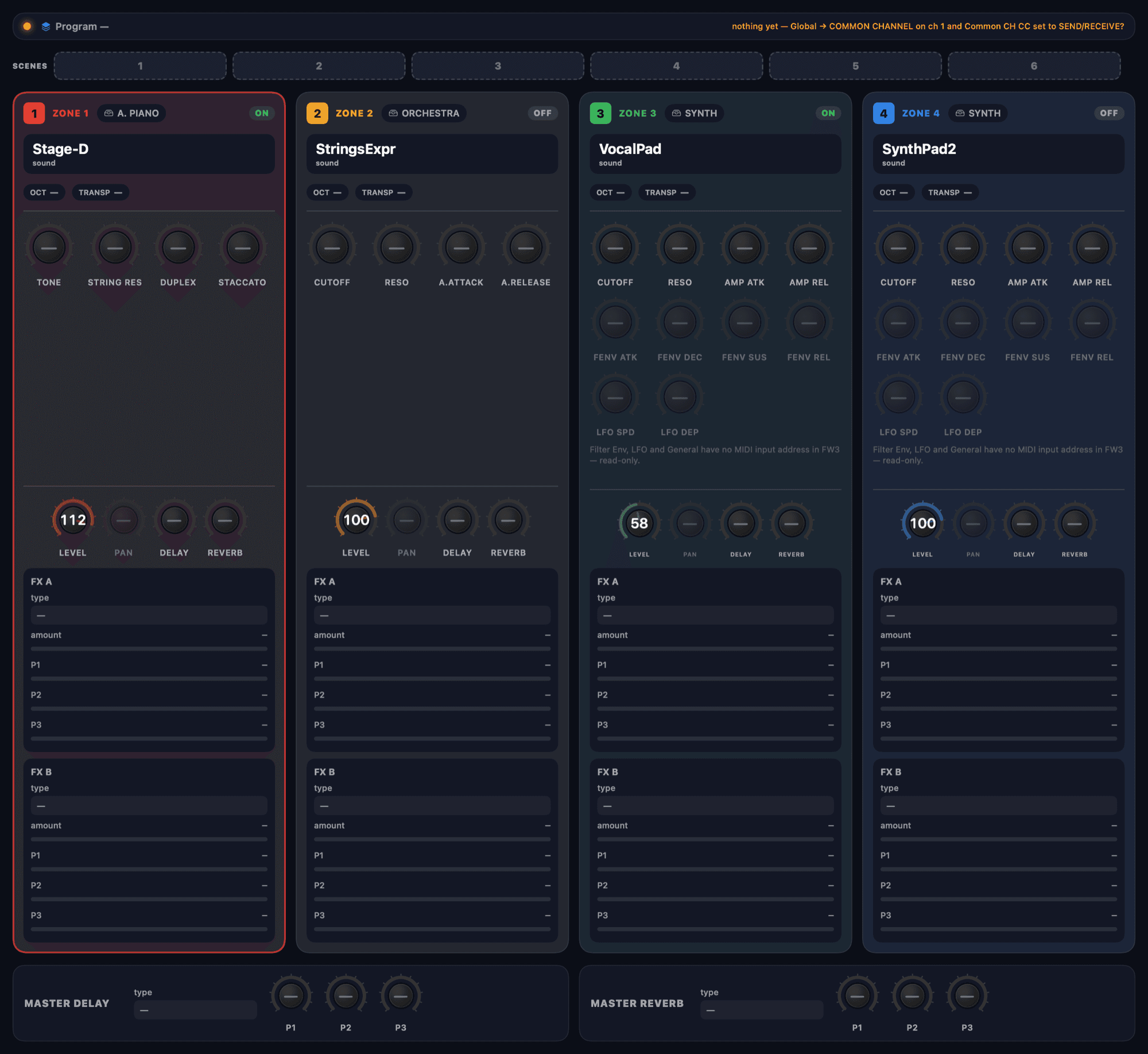
The Numa X shows one Zone at a time, behind the Zoom page. NX Editor lays all four Zones side by side — sound, on/off/mute, the engine knobs (Acoustic, Electric and Synth), level, pan, delay and reverb sends, both insert effects and the Master delay and reverb — and everything you touch is sent to the keyboard over its common MIDI channel, in real time.
Six scenes per Program switch the whole panel at once, without a cut, each in its own colour; favorites and Programs are recalled by Program Change.
Not made by, or affiliated with, Studiologic / FATAR. Made to work with the Numa X Piano.
Screens
Features
The whole Program at a glance
The keyboard shows one Zone at a time, behind the Zoom page. NX Editor lays all four side by side: sound, on/off/mute, the engine knobs (Acoustic, Electric and Synth), level, pan, delay and reverb sends, both insert effects and the Master delay and reverb — all at once.Read moreShow less
It moves the keyboard, live
Everything you touch is sent to the keyboard over its common MIDI channel, in real time — sound and Zone changes, levels, sends, effects, Split and Program changes.
Scenes, like a set list
Six scene memories per Program. Tap one and the whole panel is sent to the keyboard at once — seamlessly: a Zone that comes in fades up from silence and swaps its sound without a click, and a Zone that leaves fades down before it mutes. Each scene has its own colour, so you find it on stage.Read moreShow less
Favorites and Programs
Your own quick-access lists inside the app — sixteen groups, up to twenty-four each — recalling Programs by Program Change. Browse and switch the keyboard's Programs from the Programs tab.
Honest about what it knows
A control shows a value only when the app truly knows it — from the keyboard, or from you. Sound names are yours (a nickname) or read from the keyboard, never guessed from the factory set. The app never touches firmware.Read moreShow less
First, two switches on the keyboard
In the keyboard's Global menu, turn COMMON CHANNEL on (matching the app) and set Common CH CC to SEND/RECEIVE — that is what lets the panel talk to the keyboard.
FAQ
Is there a Numa editor for iPad (Numa X Piano)?
Yes. NX Editor is a remote panel and editor for the Studiologic Numa X Piano on iPad, iPhone and Mac: it lays out all four Zones on one screen, with six scenes per Program that switch without a cut and favorites over MIDI. It is an independent app, not affiliated with Studiologic or FATAR.
Does NX Editor make sound?
No. It is a controller and editor: the sound is always your keyboard's own. With no keyboard connected, the panel shows "—" (unknown) — by design, because the app never shows a value it does not know.
Which keyboard does it work with?
The Studiologic Numa X Piano. NX Editor is not made by, or affiliated with, Studiologic / FATAR; the keyboard's name is used only to say what it works with.
What do I need to switch on the keyboard first?
Two switches in the Global menu: turn COMMON CHANNEL on (matching the app's channel) and set Common CH CC to SEND/RECEIVE. That is what lets the panel talk to the keyboard.
How do the scenes work?
They are six memories per Program. Tap one and the whole panel is sent to the keyboard at once, without a cut: a Zone that comes in fades up from silence and swaps its sound without a click, and a Zone that leaves fades down before it mutes. Each scene has its own colour, so you find it on stage.
Does the app touch the keyboard's firmware?
Never. NX Editor only sends MIDI commands and does not touch firmware.
Does the app collect data or need the internet?
No. Everything stays on your device: no account, no tracking, no internet. Sound nicknames, favorites lists and scenes are stored only there.
Which devices does it run on?
iPhone, iPad and Mac (native) — coming soon to the App Store.
When does it launch?
Coming soon to the stores. Follow @rsjb_app for the launch announcement.
Can the editor erase sounds or damage my instrument?
The editor controls the instrument live and only writes to permanent memory when you tell it to — and writing over a slot replaces what was there. While you edit live, the sound being edited on the instrument is also replaced: anything you had not saved on it is lost. So make a complete backup of the instrument first, with the manufacturer’s own tools, and check the slots before you confirm. RSJB editors do not update the instrument’s firmware. You use them at your own risk: to the fullest extent permitted by law, we are not liable for data loss or damage to the equipment — see the Terms of Use for details.
What it's for
NX Editor is a native remote panel for the Studiologic Numa X Piano, on iPhone, iPad and Mac. It is a controller and editor, not a sound source: your keyboard stays the instrument. The Numa X shows one Zone at a time, behind the Zoom page; NX Editor lays all four Zones side by side — sound, on/off/mute, the engine knobs (Acoustic, Electric and Synth), level, pan, delay and reverb sends, both insert effects and the Master delay and reverb — and sends everything to the keyboard over its common MIDI channel, in real time. It has six scenes per Program that switch the whole panel without a cut (a Zone that comes in fades up from silence; one that leaves fades down before it mutes), each in its own colour, and favorites lists — sixteen groups of up to twenty-four — that recall Programs by Program Change. A control shows a value only when the app truly knows it — from the keyboard or from you — sound names are yours or read from the keyboard, and the app never touches firmware. 100% on your device: no account, no tracking, no internet. Not made by, or affiliated with, Studiologic / FATAR.