Tonic Synth
iOS synthesizer with physical & analog modeling, AUv3 + standalone — iPhone, iPad & Mac
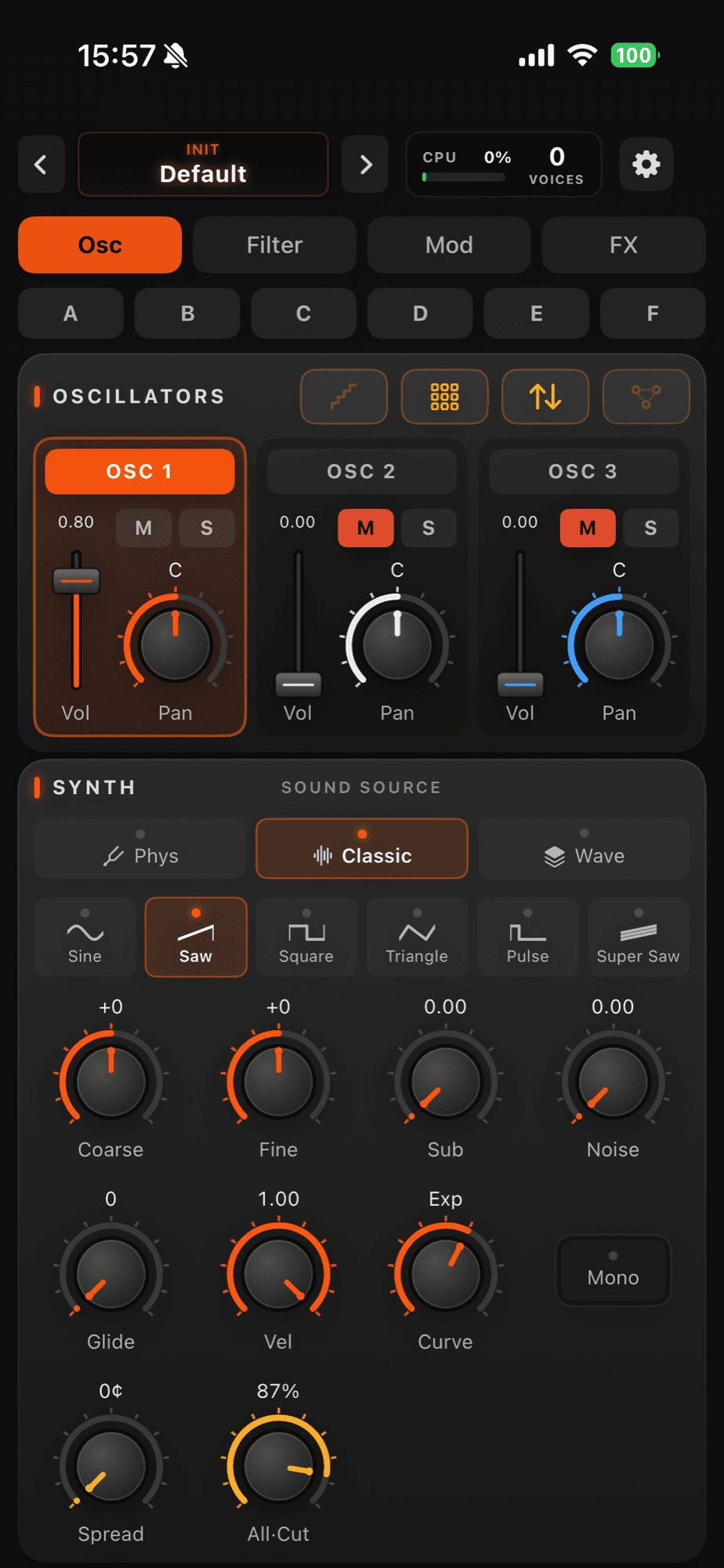
Tonic Synth is a synthesizer for iOS (iPhone and iPad) and Mac, as an app and an AUv3 plug-in: three instruments playing at once, each with its own sound engine, filter and envelope — that is what turns a piano with a pad underneath and a bell on the attack into one patch that is yours. Each layer picks from eight engines: physical modeling, analog, wavetable, SoundFont (.sf2) and 6-operator FM. Then come ten analog filters, a modulation matrix with three routes per oscillator, an arpeggiator with step sequencer and a full effects rack. Runs standalone on Mac and iOS, and as two AU and AUv3 plug-ins — an instrument and an effect — inside your host.Read moreShow less
The first Brazilian synth app for Mac and iOS. Designed and built in Brazil.
Screens
See it in action
Show the other 9 videosShow fewer
In the press
A news post on Tonic 2 — a three-layer synth for iPhone, iPad and Mac: 3D wavetables, a Vector XY pad, a 12-mode arpeggiator and eight sound models per layer, standalone and AU/AUv3.
Read the article →A feature on Tonic — an analog-modeling synth with eight synthesis engines, three layers, analog filters and AUv3.
Read the article →Features
Wind and strings that answer the touchNew
The four physical voices were rebuilt from the ground up, and each one gained the body of its instrument: blowing harder OPENS the tone instead of just getting louder, the bow scrapes as it leaves the string, and the reed gives way to a flute mouth when you want air instead of cane. Hold Breath and the gestures of a real player come with it — the click of the key mechanism, the growl inside the mouthpiece, the fluttering tongue and the breathiness of a pianissimo.Read moreShow less
Switch sounds with the note still ringingNew
Hold a key, or the pedal, and change scene or sound: what is ringing stays in the old sound until you lift your finger, and the next note comes out in the new one. It is what lets you turn the page mid-song without cutting the pad that is holding the bar.Read moreShow less
Movement, per oscillatorNew
Rate, Vib, Trem, Onset and Bloom are now one set per oscillator: a sine breathing on OSC 1 while OSC 2 stays still. With them come Unison on the string, which makes two strings sound slightly apart the way a real pair never quite agrees, and the attack phase — Reset makes every note attack the same; Free and Random start each one somewhere else in the wave, the unsteadiness that makes a pad sound analogue.Read moreShow less
Modulation matrixNew
Wires something you do to something in the sound: the wheel gives vibrato, pressure on the key opens the filter, how hard you play changes the tone. Three routes per oscillator — pick the source (LFO, envelopes, velocity, aftertouch, wheel, follower or keyboard position), the destination (filter, pitch, volume, pan, PWM, morph and more) and the amount, with a live ring on the knob showing what is arriving. It comes with a 2nd LFO per oscillator (phase, fade-in and Trigger/1-Shot/Global modes), a per-note pitch envelope and a Master Tempo with tap driving the arpeggiator, LFOs, delay and Vector.Read moreShow less
Chord MemoryNew
A chord under one finger: capture the chord from your playing or edit it note by note. Pick a scale and every key gives you the right chord of that key; split the keyboard to play chords on one side and solo on the other. And the arpeggiator can play relative to the chord.Read moreShow less
Signal Flow — and the colours are yoursNew
The live map of this sound's path — source, filter, amp, effects and output, with audio in orange and modulation in green: tap a block to jump straight to it. And pick the interface's four colours in Settings → Colours, across the app and both plug-ins.Read moreShow less
Show the other 11 featuresShow fewer
Tonica — sounds from the community
Browse sounds shared by musicians around the world, try them out and save the ones you like — and publish your own creations to the community just as easily; republishing updates the sound in place, no duplicates. Optional: the synth works fully offline without it.Read moreShow less
Record & export your performance
Record what you play — oscillators + effects — and save it as WAV or M4A: trim the start and end with the handles, audition the selection and pick where to save.
Arpeggiator & sequencer with MIDI file import
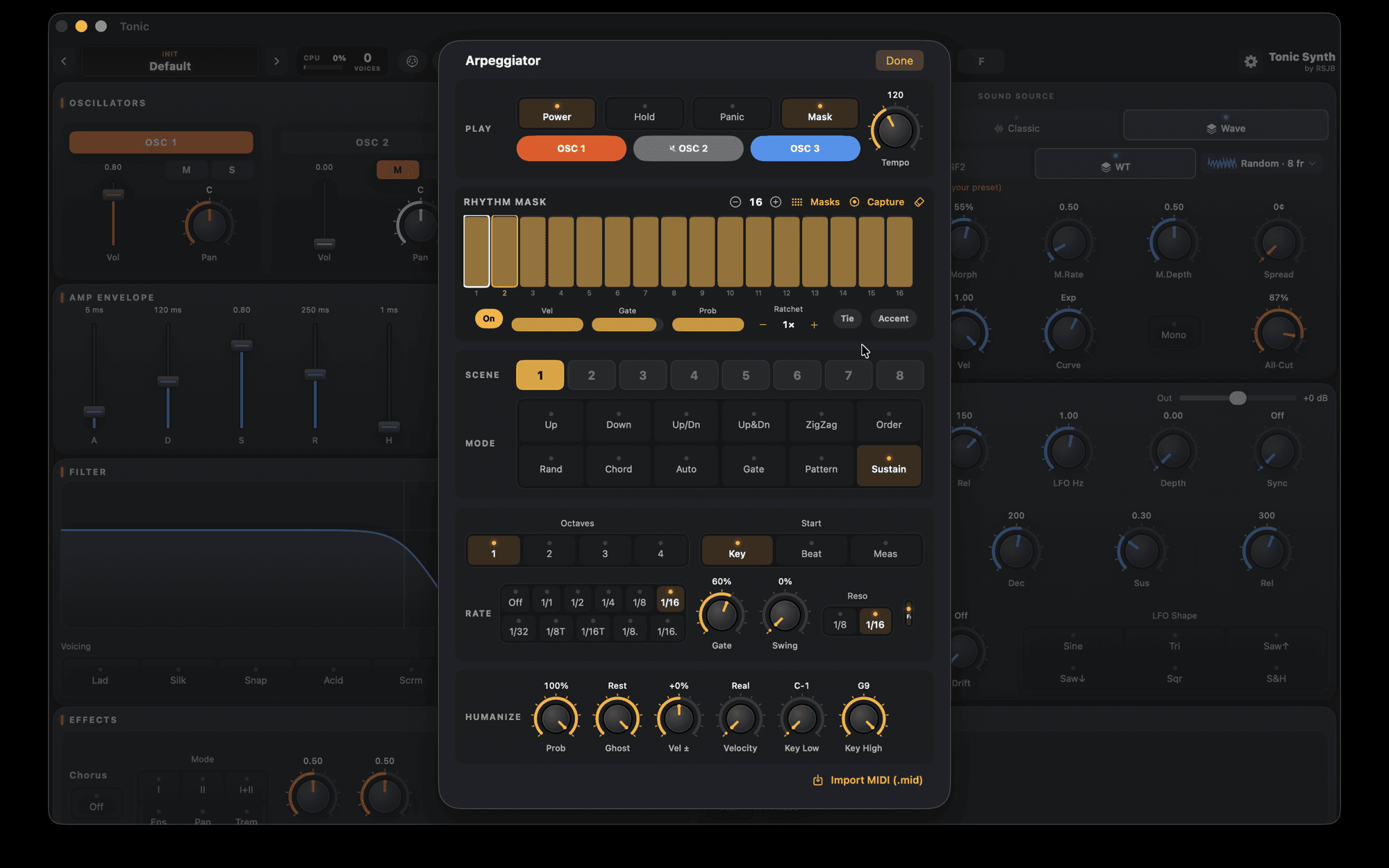
12 modes (from Up/Down and ZigZag to chords, gate and a continuous pad), up to 4 octaves, swing, ratchets, ties, accents, probability and ghost notes; a step editor with rhythm masks, capture and .mid import. Eight arp scenes per preset and a factory bank of 20 ready-made arpeggios.Read moreShow less
Your own wavetables, in 3D
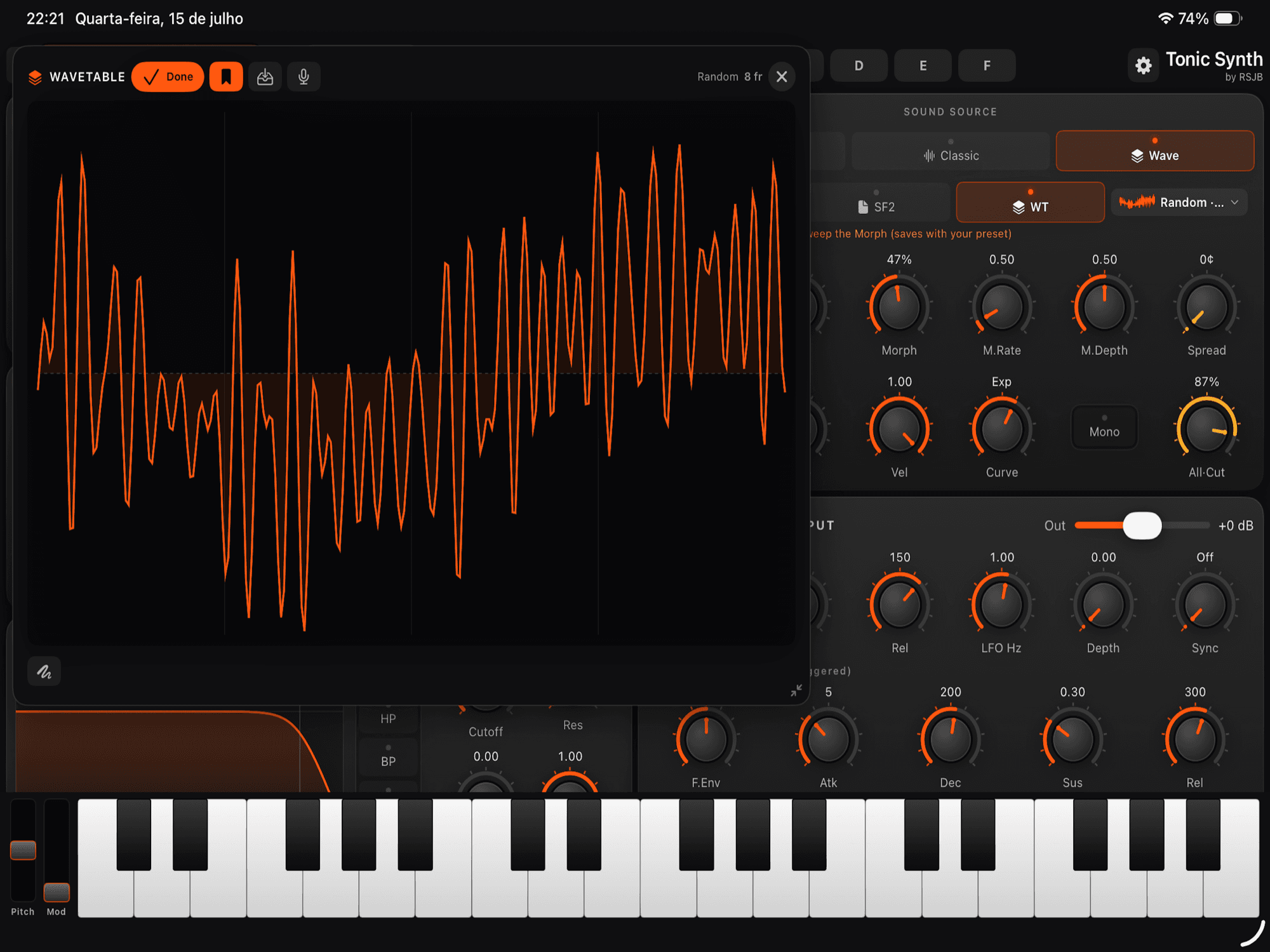
Turn any sound into a wavetable — import an audio file or record with the mic — and explore it in a 3D visualizer you can drag, rotate and draw on. Up to 128 frames, with Motion animating the table, on top of the 36 factory tables and eight new ones that SWEEP from one tone to another as you turn Morph.Read moreShow less
VectorNew
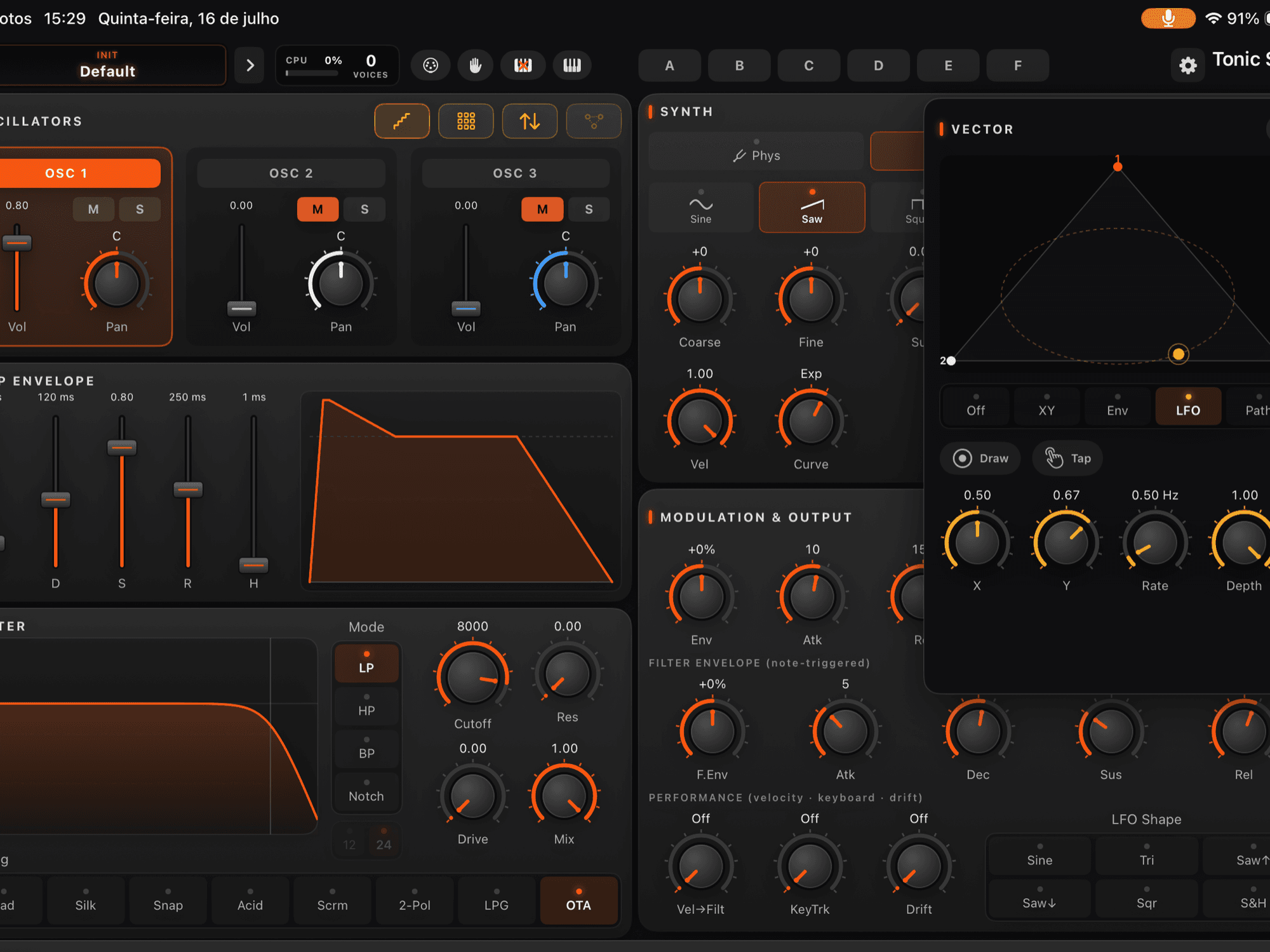
An XY pad that crossfades between the oscillators in real time — like having three instruments on an expression pedal: the piano becomes a pad, the pad becomes breath, without changing patch. Now with four corners: pick which OSC sits in each corner of the pad (the same OSC can take two corners) and tap the triangle below the pad to switch to the square. Play it by hand, drive it with an envelope, or switch on Loop, where the point travels the circle, one of twelve ready-made shapes (Shapes) or your own drawing (Draw): Size sets how big the movement is and Sync ties each lap to the tempo, from 1/8 to 8 bars. When you lift your finger the drawing closes by itself and the lap loops without a step in the sound. Each mode shows only the controls that act in it, and the path is saved with the preset.Read moreShow less
Sources
Eight engines per layer. Under Phys, four physical models that simulate the instrument actually vibrating instead of playing back a recording — String (guitar/harp-like), Modal (bells & mallets), Wind (flutes & woodwinds) and Bowed (violin/cello-like). Plus Classic (analog, with a 7-voice Super Saw and a Noise wave in 4 colours: White, Pink, Brown and Blue), Wave (wavetable), SF2 (SoundFont, reads .sf2 and .sf3) and 6-operator FM.Read moreShow less
Poly, Mono or LegatoNew
Poly for chords. Mono to solo, each note re-attacking. Legato to solo tied — keep the previous key down and the note changes pitch without starting the sound over, on any source: physical, SF2 or FM. And the wheels (vibrato, bend, glide) now reach every one of them too.Read moreShow less
Filter & envelopes
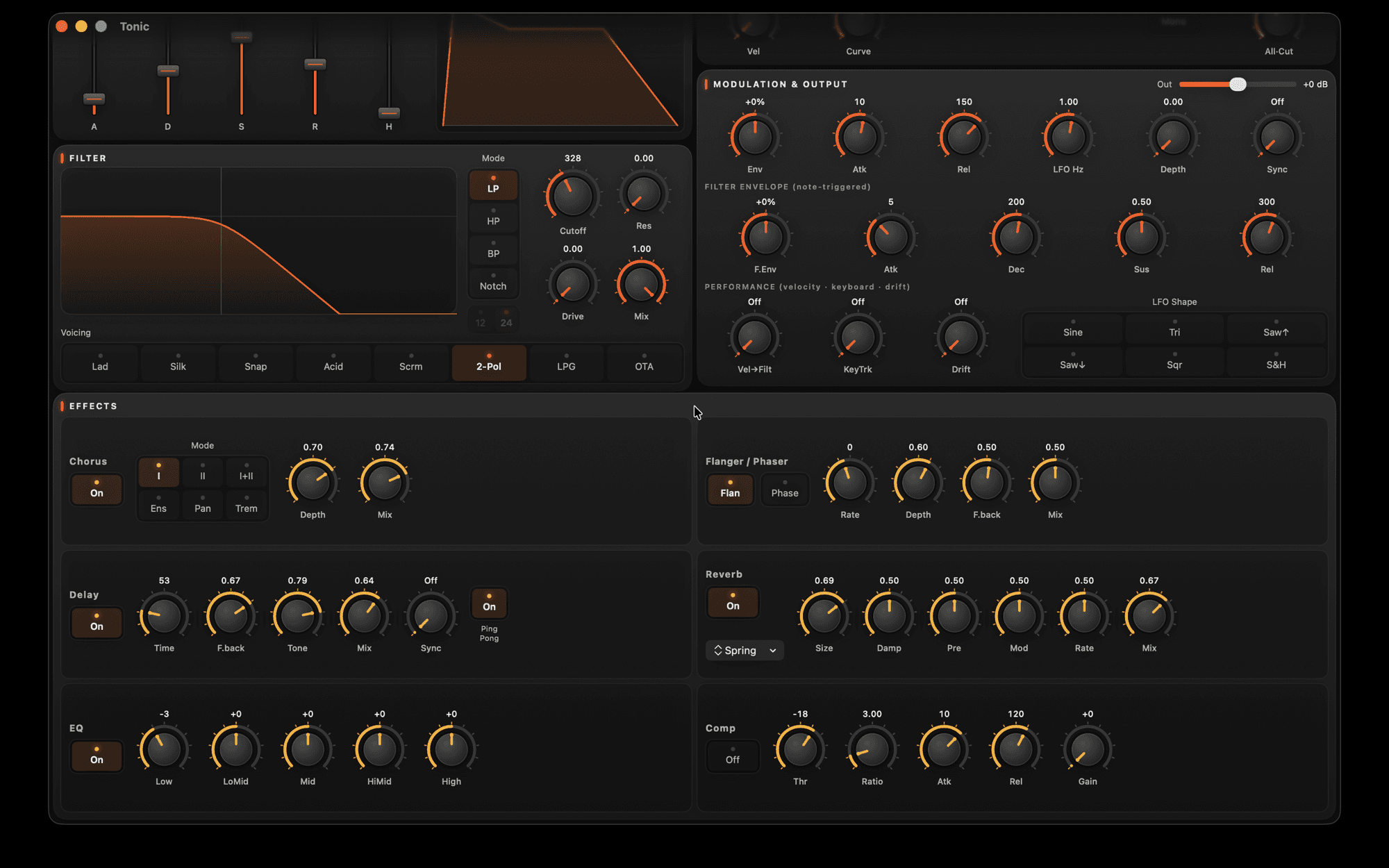
The two graphs aren't decoration, they're controls: drag on the filter curve to move cutoff and resonance, and draw the ADSR point by point — with a Linear, Exp or Log curve on a button. Ten analog-modeling voicings — Bite and Feral, the two new ones, live in the 2-Pol cell (hold it to choose): LP/HP/BP/Notch, 12 or 24 dB/oct, resonance to self-oscillation, drive and 4× oversampling.Read moreShow less
Modulation & effects
What moves the sound: a tempo-syncable LFO, envelope follower, note-triggered filter envelope, re-assignable pitch-bend and mod-wheel, ring mod across oscillators, and Follow, which makes oscillators 2 and 3 inherit oscillator 1's character while keeping their own source. The rack brings chorus, delay, an FDN reverb with independent Decay and Size and a tunable shimmer (±24 st), a 5-band EQ with adjustable Q, compressor, flanger/phaser and a stereo widener. And the new Chop: 16 steps at the end of the chain that turn a still pad into a pulse.Read moreShow less
Made to play
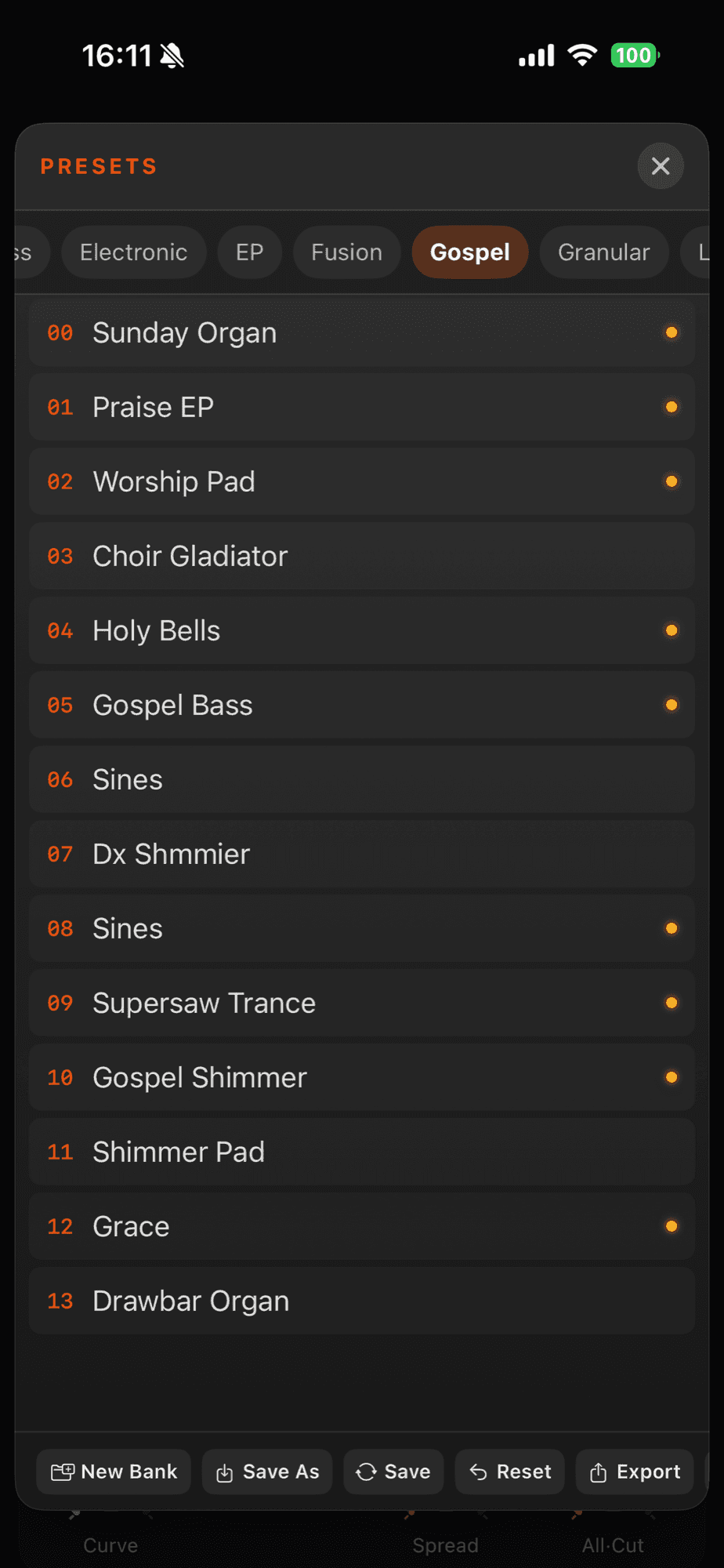
284 factory presets across 19 banks — two of them new: Physis, built with the physical voices (saxes, flutes, bows and nylon guitars), and Motion, the pads and keys that move on their own, now with search tags and Tonic’s own file formats (.tpr per preset, .tbk for your whole library). A MIDI Filter to choose which controller messages reach each oscillator, two All 1/All 2 macros, per-preset transpose and bend range, tap tempo, six scenes (A–F), MIDI Learn — now with its own range per control, and one physical knob driving up to four destinations — and an on-screen keyboard.Read moreShow less
Not just a keyboard
Tonic answers to any MIDI controller that sends notes, pitch-bend, aftertouch and CC — it doesn’t have to be a piano-style keyboard. A wind controller, like the nuRAD, plays the physical voices (Phys) with real breath: blow harder and the tone opens, the way the instrument would. Ribbon, pad and guitar-to-MIDI controllers work the same way, and any gesture on the controller becomes a destination through MIDI Learn.Read moreShow less
Guides
Create Tonic Synth patches with the help of an AI
Tonic publishes its patch format and the full control list — generated by the app itself. With that one file, the AI assistant you already use can build and tweak patches that play on your device.
Read guide →AUv3 on iPhone and iPad: how to use a synth plug-in in your host
Understand what AUv3 is and how to load the Tonic synthesizer as an instrument and as a filter inside AUM, GarageBand, Logic and more.
Read guide →FAQ
Is there a synthesizer for iOS (iPhone and iPad) that works as a plug-in?
Yes. Tonic Synth is a synthesizer for iOS and Mac that runs standalone and as two AUv3 plug-ins (instrument and effect) in GarageBand, Logic, AUM, Cubasis, Loopy Pro and other hosts. It has three layers with eight sound engines — physical modeling, analog, wavetable, SoundFont and 6-operator FM —, an analog filter, a modulation matrix, an arpeggiator and an effects rack. One-time purchase, no subscription.
Does Tonic work as an AUv3 plug-in?
Yes. Besides standalone, it runs as two AUv3 plug-ins — one instrument and one effect — in your host (AUM, Loopy Pro, GarageBand, Logic, MainStage, Cubasis, Ableton Live 11.2 or newer, and REAPER). One Mac detail that confuses people: in the AUv3 format the plug-in lives INSIDE the app, so there is no file to copy into Components or VST — just open Tonic once and it shows up in your software's list as "RSJB: Tonic Synth" (instrument) and "RSJB: Tonic" (effect).
Can I use Tonic in Pro Tools?
Yes, with a bridge — and one of our users has already confirmed it. Pro Tools only takes the AAX format, but Blue Cat's PatchWork (version 2.78 or newer) hosts AUv3 plug-ins and runs as AAX: inside it, Tonic opens normally. Two steps that aren't obvious: use the INSTRUMENT version of PatchWork ("PatchWork Synth") on an instrument track, not the effect one — on the effect version Pro Tools suspends processing when no audio comes in and the instrument stays silent; and, in PatchWork, click a plug-in slot and choose "Scan Plug-Ins" — AUv3 never shows up by scanning folders, only through that scanner. The same route works for Cubase, FL Studio and Studio One, which don't load AUv3 either. We don't ship our own VST3 or AAX plug-in today.
What kinds of synthesis does it offer?
Virtual-analog oscillators, a wavetable engine, physical modeling (string, modal, wind and bowed), plus .SF2 and sysex import.
How does the modulation matrix work?
Each oscillator has three free routes: you pick the source (LFO 1 or 2, filter envelope, pitch envelope, velocity, aftertouch, mod wheel, envelope follower or keyboard position), the destination (filter, pitch, volume, pan, PWM, morph, resonance, drive, mix or output) and the amount. A live ring on the knob shows how much is arriving, and the Listen button finds the destination as you turn a control. Every oscillator also has two LFOs — with phase, fade-in and Trigger, 1-Shot and Global modes — and a per-note pitch envelope.
What is Chord Memory?
It is a chord under one finger: you capture the chord from your own playing or build it note by note, and every key then plays the whole chord. Pick a scale and the transposition moves by degrees — the chord changes quality on its own to fit the key — and the keyboard split lets you play chords on one side and solo on the other. The arpeggiator can also play relative to the chord.
Can I play it over MIDI?
Yes — over Bluetooth or USB, with pitch-bend, mod-wheel and MIDI Learn on any control. And it doesn't have to be a keyboard: a wind controller, like the nuRAD, plays it too — breath opens the tone on the physical voices.
Is there a subscription?
No. It is a one-time purchase, with no ads.
Which devices does it run on?
iPhone, iPad and Mac — on the App Store.
Does Tonic do FM and play SoundFonts?
Yes — among the 8 sound models there is 6-operator FM (which loads .syx cartridges) and a SoundFont player (reads SF2 and SF3), plus physical modeling, analog and wavetable.
Can I switch sounds live?
Yes. Tonic has six scenes (A–F) that store the whole patch — including the loaded SF2/FM sources — and you move from one to another live by tapping a letter.
Does Tonic have an arpeggiator?
Yes — a full-featured arpeggiator with 12 modes (Up, Down, Up/Dn, ZigZag, Order, Random, Chord, Gate, Pattern, Sustain and more), up to 4 octaves, swing, ratchets, ties, accents, probability and ghost notes. The step editor has polymetric rhythm masks, capture of your own playing and .mid import; you can choose which oscillators arpeggiate (the others hold the pad), limit the keyboard range and humanize timing/velocity. Eight arp scenes travel inside every preset, with tap tempo and external MIDI clock; with Hold, the pattern keeps running.
What is Tonica?
It's Tonic's sound cloud: browse sounds shared by musicians around the world, try them and save the ones you like — and publish your own with a tap. It all happens inside the app and only in Tonic's native preset format (you can't upload other files). It's optional (the synth works fully offline without it): what leaves is just the preset, the author name you choose and an anonymous identifier (so you can delete it later) — no tracking and no ads — and you can remove what you published whenever you like, with the delete button.
How do I find the hidden knob shortcuts (long-press and double-tap)?
Look at the control's label: if the name is UNDERLINED, that knob has an extra function on LONG-PRESS — no underline, no hidden action. That is how you find the shortcuts without memorising anything. The three golden rules: (1) underlined label = extra on long-press; (2) DOUBLE-TAP a control to return it to its factory default; (3) DOUBLE-TAP a section title to reset every control in that block at once. And holding a fader/knob opens fine-tune, with a precision knob and a typed value. Examples of "extra on long-press": the All knob picks WHICH knob it drives across the 3 layers, an EQ band's gain opens its frequency, and Sub/Noise step outside the filter.
I change the LFO or filter envelope but hear no modulation. Why?
All of Tonic's modulation sweeps the filter Cutoff — with the Cutoff maxed out the sound is already fully open, so there is nothing left to sweep. To hear it: in Filter, lower the Cutoff (~1 kHz) and raise Resonance (~0.4) in LP mode; then, in Modulation, raise LFO Depth at Rate ~2–4 Hz (or use the filter envelope with a short Attack). The sweep becomes obvious. Open the Cutoff back up and the effect disappears — that is by design.
How do I build a moving pad?
Pick the Classic source with a Saw wave (or Super Saw); in the Envelope, raise Attack (~1–2 s) and Release (~2–3 s) so it fades in and out; in Filter, set Cutoff ~1.5 kHz with a little Resonance; in Modulation, use LFO shape Sine with medium Depth and Sync (e.g. 1/2) so the filter breathes in time; finish with Reverb (Hall) and a touch of Chorus. Dial the Cutoff to taste.
How do I make a sound more percussive or softer (ADSR)?
The ADSR envelope shapes the note's volume. Percussive (pluck): short Attack, fast Decay, low Sustain. Soft (pad/strings): long Attack and Release. Sustain is the volume while you hold the key; Release is how long the sound takes to fade when you let go.
What does each effect do?
Reverb adds space/ambience; Delay creates echoes (lock to tempo with Sync and use Ping-Pong for stereo); Chorus thickens and widens; Flanger/Phaser add movement (a metallic sweep or a phase shift — one at a time); EQ balances lows/mids/highs; Compressor controls dynamics and "glues" the sound. Each effect toggles on/off and can be routed per layer.
How do I make a full, rich synth with wavetables (not 8-bit)?
A wavetable on its own is a static oscillator — the "8-bit" tone comes from playing a single raw cycle with no filter and no movement. The step-by-step recipe: 1) Source — in an OSC's WT menu pick a factory table or bring your own (Import wavetable, or Sample → Wavetable with the mic, in the app); when capturing, choose Multi-frame so the timbre has somewhere to evolve. 2) Movement — long-press the Morph knob and turn on Morph motion (LFO or Env), or use the Vector pad so the sound drifts between the three OSCs; this is what removes the static feel. 3) Body — enable OSC 2 and 3 on the same (or complementary) tables with a little detune, pan them apart, and add a Sub for weight. 4) Filter — lower the Cutoff (~1.5–2.5 kHz), a touch of Resonance, and a filter envelope (Attack/Decay) so the sound "opens". 5) Space — Chorus + Reverb and a subtle Delay. 6) Play with dynamics: velocity opens the filter. Tip: open the Waves preset bank to hear ready-made examples and take them apart.
Where to get it
Controls
Show the full reference12 groups · 85 controls — every knob, button and value range
Synth
9
Tonic Synth only — generates the sound; 8 models, in 3 layers
| Control | What it does | Range / options |
|---|---|---|
| Sound source | What kind of instrument the layer is. Phys: four physical models — String (guitar/harp-like), Modal (bells & mallets), Wind (flutes & woodwinds) and Bowed (violin/cello-like). Plus Classic (analog), Wave (wavetable), SF2 (SoundFont) and 6-operator FM. | 8 models |
| Waveform | (Classic) The raw material the filter will carve — the more harmonics, the more the filter has to work with. Saw is the richest (leads, bass, brass), Square is hollow and woody, Sine is smooth and the filter can only turn it down. Hold Noise to pick its colour. | 7 shapes |
| Damping / Tone | (String/Wind/Bowed) How much the instrument's material absorbs the highs while the note rings — a hand on the string, breath in the tube, bow on the hair. Low is bright and open; high muffles it and the note dies fast, like a palm mute. | 0 … 1 |
| Wavetable | Choose from 36 factory tables (Organ, Glass, Vocal, Metallic…) — or make your OWN: import an audio file or record with the mic (Sample → Wavetable), edit, redraw and randomize in the hub with a live 3D view and morphing across up to 128 frames | 36 tables + your own · up to 128 frames |
| FM | One oscillator modulates another and builds harmonics from nothing — what analog can't do: glassy electric pianos, bells, bass with a click. Loads .syx voice cartridges | .syx cartridge |
| SF2 (SoundFont) | (SF2) No simulation and no oscillator: plays real recordings of instruments from an .sf2 or .sf3 file — pianos, strings, horns, drums | .sf2 bank |
| Level | This layer's volume before the filter — this is where the proportion gets decided: a touch of bell over a lot of piano reads as one bright piano; half and half reads as two instruments | 0 … 1 |
| Velocity curve | Matches Tonic to your keyboard and your hand. If you have to hammer for volume, use Soft/Soft+; if it blasts with barely a touch, use Exp/Exp+/Exp++, which need a harder hit for full. Lin is the direct response — per layer | 6 curves: Soft+ … Exp++ |
| Voice | Poly plays chords. Mono lets go of one note at a time, each one re-attacking. Legato ties: keep the previous key down and the note changes pitch without starting the sound over — now on the physical voices, SF2 and FM too, and the wheels (vibrato, bend, glide) reach every source as well. Hold the button to pick the oscillator phase | Poly · Mono · Legato |
3 independent layers (with mute/solo) and a per-layer keyboard split, to build splits and stacked layers. Each layer also has a sub-oscillator and noise (hold the knob to take them out of the filter → "Sub·PF"/"Noise·PF"), glide (portamento, 0–2000 ms), detune (Coarse ±24 st · Fine ±50¢), PWM (pulse-width, on Classic), two "All 1"/"All 2" macros that turn a chosen knob across all 3 layers at once, and a Main fader — the master volume of the whole instrument (−28 … +12 dB).
Envelope (ADSR)
4
the "shape" of the note volume — applies to every model
| Control | What it does | Range / options |
|---|---|---|
| Attack | How long the note takes to reach full volume. Short is percussion, born at maximum; long is a string section swelling | 1 ms … 45 s |
| Decay | The fall from the peak to the Sustain level. This is what separates a piano from an organ: on the piano the note drops right after the strike, on the organ it never drops | 1 ms … 45 s |
| Sustain | The volume the note holds while the key is down. At 0 it dies on its own even with your finger there, like a piano; at maximum it stays firm until you let go, like an organ | 0 … 1 |
| Release | How long the note takes to fade after you let go. Short cuts it dead, like damping the string; long is the piano's sustain pedal. Too long and notes start piling up | 1 ms … 45 s |
Filter
4
the core — in both plug-ins
| Control | What it does | Range / options |
|---|---|---|
| Cutoff | The point from which the filter cuts. Closed it is the sound behind a door — muffled, far away; open, it steps forward and shines. The knob you will turn most | 20 Hz … 20 kHz |
| Resonance | Raises a peak at the cutoff point, and that peak is what gives the filter a vowel — what makes a wah say "wah" instead of just opening and closing. A little gives focus; at maximum it whistles on its own, with no note at all | 0 … 1 |
| Mode | Which part of the sound gets through. LP keeps the lows and darkens (the default). HP removes weight — how you make room for the bass line. BP keeps one strip only: telephone sound. Notch removes one strip and keeps the rest: hollow, like a frozen phaser | LP · HP · BP · Notch |
| Slope | How hard the filter cuts past the point. 12 dB/oct lets more treble through and sounds soft and open — good on pads and brass. 24 dB/oct cuts firmly and sounds fat and dark — the synth-bass slope | 12 · 24 dB/oct |
Lad, Acid, Scrm and LPG are their own low-pass designs (4-pole). Slope acts on the Silk, Snap, 2-Pol voicings and on all HP/BP/Notch modes.
Voicings — the analog character
10
changes the "colour", not the shape; each models a classic circuit
| Control | What it does | Range / options |
|---|---|---|
| Lad | Warm and creamy, fattens the low end as it closes — the synth-bass filter, period | |
| Silk | Clean and transparent: closes the sound without removing weight or imposing character. Use it when the patch is already good and the filter just needs to get out of the way | |
| Snap | The resonance cracks and bites — good on plucks and percussive bass, where the filter's peak is part of the attack | |
| Acid | Aggressive and squelchy, built for acid-house resonant lines. Open the resonance and ride the Cutoff while you play | |
| Scrm | It genuinely distorts when you push drive and resonance. Use it on leads and anything that needs to tear — it raises the level a lot, check the Output afterwards | |
| 2-Pol | The gentle slope: even closed it lets treble through, so it darkens without going dull. Good on pads and brass | |
| LPG | Instead of only cutting, it closes volume and tone together — like an acoustic instrument losing brightness as it dies. Plucky and mellow | |
| OTA | Clean, smooth and predictable end to end — the safe pick when you don't want the filter imposing a character of its own | |
| Bite | A dry, snappy two-pole: the resonance arrives as an edge on the attack rather than a swell, so it cuts through without thickening the note. It lives in the 2-Pol cell — hold it (right-click on the Mac) to choose | |
| Feral | The one that sounds broken on purpose: it grits and rasps before the resonance even comes in, because the dirt is at the input. For leads and textures that need to tear — on a clean pad it will sound wrong, and that is the point. Also in the 2-Pol cell |
Character & output
3
| Control | What it does | Range / options |
|---|---|---|
| Drive | Pushes the signal harder into the filter, like turning a valve amp up until it dirties. A little warms and thickens; a lot tears — great on bass and leads, dangerous on pads | 0 … 1 |
| Mix | Blends the filtered sound with the original. Halfway you can close the filter without losing the body of the sound — the trick for darkening a pad without it disappearing. At maximum, filtered only | 0 … 1 |
| Output | This layer's output gain, a makeup after the filter — raise it if the filter or drive ate the volume. The global master is Main | −24 … +12 dB |
Effects
6
an output rack — each effect toggles on/off
| Control | What it does | Range / options |
|---|---|---|
| Chorus | Makes slightly delayed, detuned copies — the same trick as two violinists on one line, never quite together. Thickens and widens. 6 modes (I, II, I+II, Ens, Pan, Trem). Knobs: Depth, Rate, Mix | Rate 0.05–12 Hz · Depth/Mix 0–1 |
| Delay | Repeats what you played after a gap. Locked to tempo (sync) it stops being an echo and becomes arrangement: one note turns into a phrase, a chord into a rhythm. Ping-pong throws the repeats between the speakers. Knobs: Time, Feedback, Tone, Mix | Time 20–2000 ms · Sync 1/1–1/32 · Fb ≤0.95 |
| Reverb (FDN) | Puts the sound inside a place — removes that "synth recorded in a sealed box" feeling. 6 types (Room, Hall, Cathedral, Plate, Spring, Shimmer). Knobs: Decay (hold = Size, the room size, independent), Damp, Mix (+pre-delay/mod; hold Mod = Shimmer Pitch, ±24 st) | 6 types · Decay/Size/Damp/Mix |
| EQ (5-band) | Lifts or lowers ranges across the whole patch. On a synth it is less about fixing and more about making room: pulling out lows that crowd the bass, mids that sit on the vocal. Hold a band's gain to set its frequency | ±15 dB · per-band freq 40 Hz–18 kHz |
| Compressor | Automatically turns down whatever is too loud, so nothing disappears and nothing jumps out — the patch stays steady without you playing evenly. On pads and bass it is almost mandatory. Knobs: Threshold, Ratio, Attack, Release, Makeup | Thr −48…0 dB · Ratio 1–20 · Atk 0.1–100 ms |
| Flanger / Phaser | One at a time. Flanger: a copy delayed by a tiny amount, and the delay keeps moving — the jet-plane whoosh. Phaser: moving holes in the spectrum, softer and more watery — the slow electric-piano wah. Knobs: Rate, Depth, Feedback, Mix | Rate 0.02–10 Hz · Fb ≤0.95 · Depth/Mix 0–1 |
Modulation
9
the filter moves on its own
| Control | What it does | Range / options |
|---|---|---|
| Env → Cutoff | Tracks how loud you are playing and moves the Cutoff with it: an auto-wah, no note involved. + = play hard, it opens; − inverts. Funk, percussive keys and guitar wah live here | −1 … +1 |
| Env Attack / Release | How fast the follower reacts and falls back. A short Attack catches the attack, a long one becomes a slow swell; a short Release closes the filter behind each note, a long one keeps it open in between | short … long |
| Filter envelope (ADSR) | Its own ADSR, note-triggered, opening and closing the Cutoff by itself — the "tchow" of a synth bass and the brightness that dies with an electric-piano note. With Amount at 0 it does nothing | A/D/S/R |
| LFO Depth | How far the LFO sweeps the Cutoff. At 0 the LFO is running, but nothing happens until you open this | 0 … 1 |
| LFO Rate | How fast the sway is when free-running. Below 1 Hz it is a slow pad drift; around 5 Hz it is a player's hand; above 10 it becomes an effect | in Hz |
| LFO Shape | Sine and Tri rise and fall smoothly — natural vibrato and tremolo. The Saws ramp and snap back, good for risers. Square jumps between two values: trance gate. S&H draws a random value each cycle, the 80s bubbling sound | Sine · Tri · Saw · Square · S&H |
| LFO Sync | Locks the LFO to musical divisions instead of Hz, so the movement lands with the song | 1/1 … 1/32 |
| Mod wheel (target) | The mod wheel can drive ANY knob: double-tap the wheel to pick which one — saved per preset | any parameter |
| Oversampling | Fixed at 4× — automatically cleans harshness (aliasing) from Drive and high resonance | Auto · 1× · 2× · 4× |
All modulation here sweeps the Cutoff. With the Cutoff maxed out you hear nothing — close the Cutoff (~1 kHz) and raise Resonance a bit for the sweep to show up.
Scenes & routing
3
live performance and how each layer uses the effects
| Control | What it does | Range / options |
|---|---|---|
| Scenes (A–F) | Six memories of the whole patch — every parameter and the loaded SF2/FM sources. They are the variations within one song: verse on one scene, chorus on another; switch live by tapping the letter | 6 scenes |
| Routing (per layer) | Chooses which effects each layer feeds — what lets the pad swim in reverb while the bass stays dry up front, in one patch. A send matrix for Chorus, Delay, Reverb, EQ, Compressor and Modulation | 3 layers × 6 effects |
| Vector (XY pad) | A live crossfade between the oscillators, like having three instruments on an expression pedal: the piano becomes a pad, the pad becomes breath. Four corners: pick which OSC sits in each corner (the same OSC can take two) and tap the triangle below the pad to switch to the square. Play it by hand, drive it with an envelope, or use Loop — the point travels the circle, one of twelve ready-made shapes (Shapes) or your own drawing (Draw). Size sets how big the movement is, Sync ties each lap to the tempo and Amount sets how much it acts. Each mode shows only the controls that act in it; the path is saved with the preset | XY · 4 corners · Size 0–1 · Sync 1/8–8 bars |
Arpeggiator
10
hold a chord and it plays for you — the "staircase" button on the oscillators row
| Control | What it does | Range / options |
|---|---|---|
| Power / Hold | Turns the arp on (the icon blinks in time while it plays). Hold keeps the chord running after you let go — also in Gate mode; Panic releases everything | on/off |
| Mode | The shape the notes follow: Up, Down, Up/Dn, Up&Dn, ZigZag, Order, Rand, Chord, Auto, Gate, Pattern and Sustain (a continuous pad) | 12 modes |
| Rate / Octaves | Speed of the phrase (tempo divisions) and the arpeggio range in octaves | tempo-synced · 1–4 octaves |
| Gate · Swing · Humanize | Gate = each note's length (short is a staccato pluck; 100% ties the notes). Swing delays the off-beats for bounce. Humanize loosens timing and dynamics so the phrase doesn't sound machine-made | 0 … 1 |
| Rhythm mask | A step grid that becomes the groove — the mode picks THE NOTES, the grid THE RHYTHM. Polymetric, with Capture of your own playing and .mid file import | grid + capture + .mid |
| Step editor | Per step: tie, rest, ratchet, accent, probability/ghost and velocity — with a live playhead while it plays | per step |
| OSC 1/2/3 | Choose WHICH oscillators play the arpeggio — the others play normally at the same time (e.g. arp on OSC 1, a held pad on 2/3) | any combination |
| Key Low / High | Limits the arpeggiator to one part of the keyboard — outside it you play free: bass in the left hand, arpeggio in the right | keyboard range |
| Tempo (tap) | The app's BPM (shared with Delay/LFO Sync): drag it or tap the knob in rhythm (tap tempo); follows external MIDI clock — in AUv3 the DAW rules | 40 … 240 BPM |
| Arp scenes (1–8) | Eight snapshots of the whole arp (mode, timing, humanize, tempo, grid) that travel INSIDE the preset — tap to use; hold to save/copy/reset | 8 scenes |
Long-press the arp button to copy the arp from another preset ("Copy from"). The panel floats on iPad/Mac — the keyboard stays playable; in Sustain mode, Freeze holds the pad. And the factory "Arp" bank ships 20 ready-to-play presets.
Interface icons
7
standalone app buttons (in AUv3 the host handles presets)
| Control | What it does | Range / options |
|---|---|---|
| Settings | Opens settings: audio (rate/buffer + per-output interface on Mac), MIDI (Bluetooth, hot-plug, external clock) and "keep screen awake" | on/off |
| Show/hide keyboard | Toggles the on-screen keyboard — which can echo incoming external-MIDI notes or the arpeggiator's steps | on/off |
| MIDI Learn | Ties a CC from your controller to a knob on screen (tap the icon, move the knob, send the CC) | on/off |
| Hold (latch) | Holds the notes sounding without keeping your finger down — also latches external MIDI notes and the arpeggiator | on/off |
| Panic | Kills all stuck notes (all notes off) | — |
| Preset ◀ ▶ | Step to the previous/next preset | — |
| Preset browser | Save, open, export and import preset banks | — |
In the AUv3 plug-in, presets appear in the host (DAW) preset menu.
Gestures & shortcuts
13
the three golden rules: underlined label = extra on long-press · double-tap = reset · hold = fine-tune
| Control | What it does | Range / options |
|---|---|---|
| Underlined label | The small underline beneath a control's name means it has an EXTRA function on long-press. No underline, no hidden action — that is how you find the shortcuts without memorising them | visual cue |
| Double-tap a control | Returns that control to its factory default — works on knobs and faders | reset |
| Double-tap a section title | Resets EVERY control in that section/slot at once (the title acts as a "reset block") | section reset |
| Hold a section title | Takes the whole block — Synth, Filter, Amp Envelope, Modulation or Effects — to another oscillator, or to another sound: copy and paste the section at once | copy/paste block |
| Hold Voice | Picks the oscillator's phase at note-on: Reset always starts the same; Free and Random start somewhere else in the wave each note — the instability that makes a pad sound more analogue | Reset · Free · Random |
| Hold Sub / Noise | Sends the sub-oscillator or the noise straight to the output, outside the filter: the bottom stays firm and the breath stays there even with the filter closed. The label becomes "Sub·PF" / "Noise·PF"; hold again to undo | pre ↔ post-filter |
| Hold All 1 / All 2 | Picks which knob each macro drives across the 3 layers (Cutoff, Resonance, Drive, ADSR, Sub, Noise) or globally (Vector, Main, arp). It is the performance knob: it opens the whole patch in one move, no hunting three controls. Saved per preset and per scene | up to 15 targets |
| Record | Records what you play (oscillators + effects); when you stop, trim the start/end with the handles, audition the selection and save it as WAV or M4A anywhere | WAV · M4A · up to 10 min |
| Hold an EQ gain | Opens that EQ band's frequency | — |
| Hold a fader/knob | Opens fine-tune: a precision knob + typed values (with +/−, respecting range and step) | — |
| Double-tap Transpose/Bend | Sets the transpose and pitch-bend range PER PRESET (there is also a global transpose) | bend 1 … 24 st |
| Tap an OSC (mixer) | 1 tap enables/selects the layer; 2 taps turn it off (mute) | — |
| Tap a scene | 1 tap recalls the scene; 2 taps open the editor (keyboard split) | — |
On Mac, right-click stands in for "hold" wherever there is a menu (the "All" knob, scenes).
Quick recipes
7
combinations to start from
| Control | What it does | Range / options |
|---|---|---|
| Acid bass | Classic + Saw, Sustain 0.3 · Voicing Acid, Cutoff ~700, Resonance 0.85, Env→Cutoff +0.5 | |
| Guitar auto-wah | Voicing Lad, LP mode, Cutoff ~400, Env Amount +0.7, Env Attack 5 ms | |
| Ethereal bell | Phys → Modal, Release ~1 s · 2-Pol voicing, Cutoff ~6 kHz, Resonance 0.2 | |
| Dub wobble | LP mode, LFO Sync 1/8, LFO Depth 0.8 | |
| Screaming lead | Voicing Scrm, Resonance 0.85, Drive 0.4 | |
| Organic pluck | Classic + Sine, Sustain 0 · Voicing LPG | |
| Moving pad | Classic + Saw, Attack ~1.5 s, Release ~2.5 s · Cutoff ~1.5 kHz, Resonance 0.2 · LFO Sine, Sync 1/2, medium Depth · Reverb Hall |
What it's for
Tonic Synth is a synthesizer for iOS — iPhone and iPad — and for Mac that runs standalone and as two AU and AUv3 plug-ins (an instrument and an effect) inside your favourite host — AUM, Loopy Pro, GarageBand, Logic, Cubasis, Drambo and more. It has three layers with eight sound models — physical modeling (string, modal, wind, bowed), analog, wavetable, SoundFont (SF2/SF3) and 6-operator FM —, a ten-voicing analog filter, a modulation matrix with three routes per oscillator (LFOs, envelopes, velocity, aftertouch, wheel and more, driving filter, pitch, volume, pan, morph…), a step arpeggiator/sequencer, Chord Memory with scale and split, WAV/M4A performance recording and a rack with chorus, delay, reverb, EQ, compressor, flanger/phaser, stereo widener and Chop. With Tonica, you can also browse and share sounds with the community — optional, and the synth runs fully offline without it. One-time purchase, no subscription.
Made in Brazil · First of its kind